.svg)
Graph editor | About
Introduction
The Graph Editor is TwikBot’s core application for defining the blueprint of a customizable product. It uses a node-based interface to create, modify, and release parametric products.
Starting from raw product resources such as meshes, textures, and materials, the Graph Editor allows you to define the full scope of product customization, from user inputs and logic to visualization and manufacturing outputs.
While not required, a basic understanding of CAD software is beneficial when working with the Graph Editor, as many concepts build on parametric and geometric workflows.
Graph Editor
The Graph Editor provides a visual, node-based environment where product logic and behavior are assembled by connecting inputs, geometry, logic, and outputs.
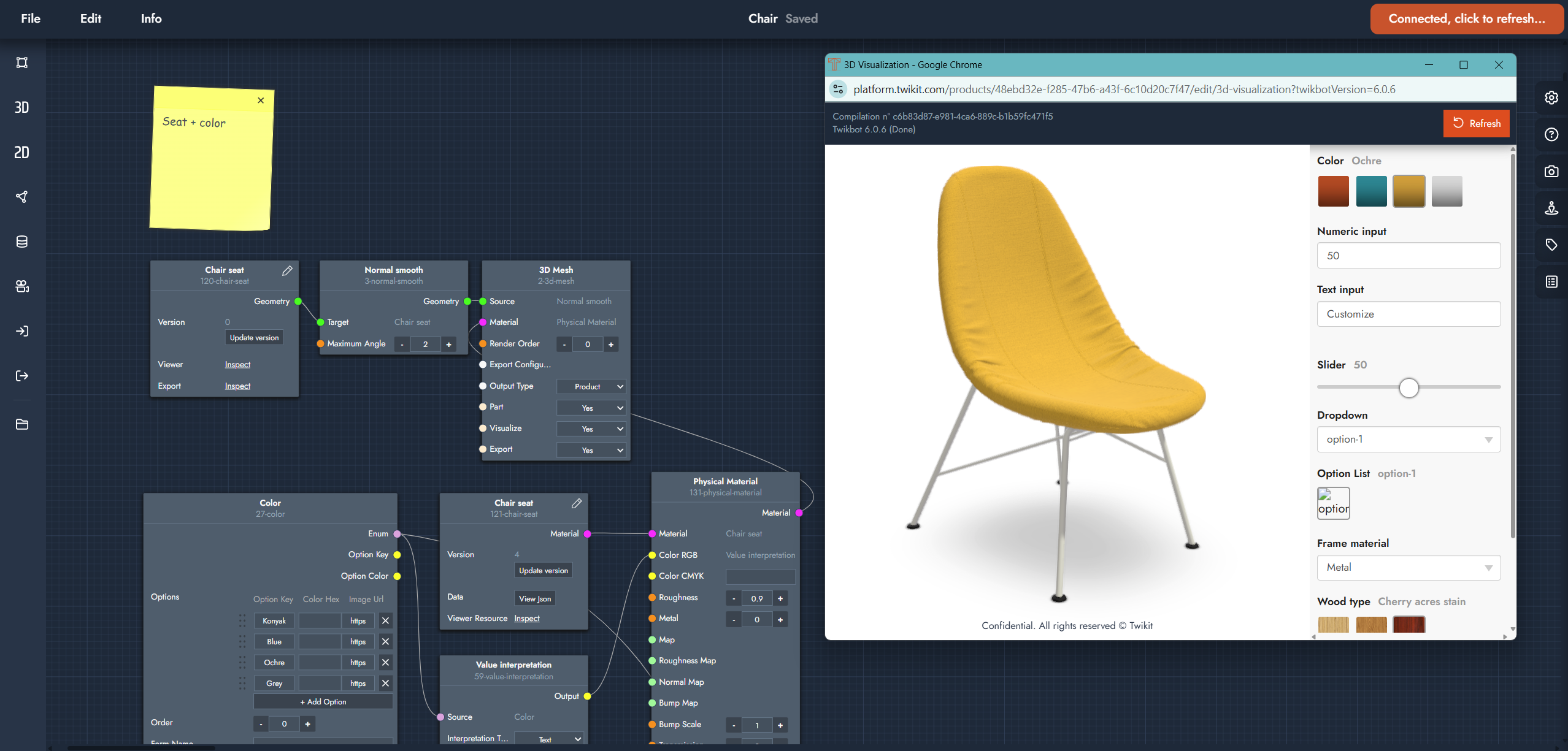
Graph editor
Key features
🔐 Secured data: A secure platform to create, refine, and deploy product customizers.
🔗 Node-based Design: Design and fine-tune product customizers using an intuitive node-based interface.
🌐 Real-time Visualization: Experience live product customizers directly within a web browser.
📋 Resource Management: Organize and manage vital product assets, including CAD data, textures, and materials.
🎥 3D Environment Control: Adjust and control your 3D scene settings like camera angles and lighting.
♾️ CAD Software Integration: Seamlessly interface with established CAD software like Rhino Grasshopper.